BarTender SDK case: Android PDA scanning triggers price label printing
Domain(GZ)IOT Science and Technology Co., Ltd (广州市领域物联网科技有限公司) is a BarTender authorized reseller. Its publicly displayed 2026 Silver Reseller Partner certificate is available for review on the certification page. This article describes a delivered project: store staff at a daily chemical retail company scan with an Android PDA, send price label jobs to a configured print entry, and read the job result message. The BarTender SDK mentioned in this article refers to development tools that connect label printing to business software.
The scenario of this case is as follows: store staff scan a product with an Android PDA, then start a price label job in the designated printing environment. Besides passing the barcode, the mobile side has to first determine the store, query the product data, choose a template, and read the job status returned by BarTender.
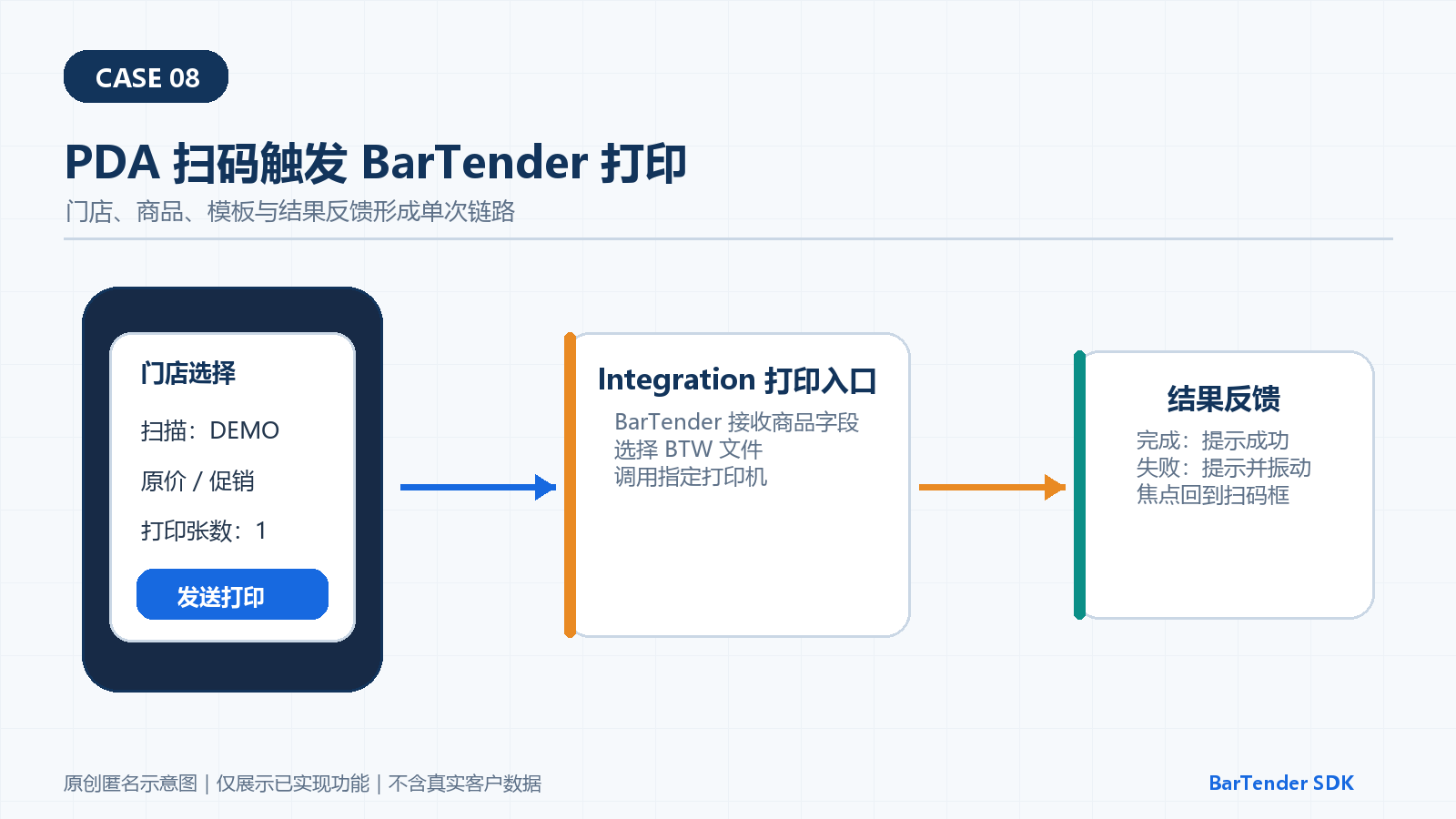
On the method side, the PDA application first loads the store list and saves the current store. After a barcode is scanned, the application queries the product within the store scope and displays the brand, product code, name, primary barcode, regular price, promotional price and promotion dates. The operator can use the default, regular price or promotional price rule and fill in the number of copies. The application then encodes the product fields, the template file and the copy count into the configured print entry.
On the printing computer side, the program reads the template file parameter according to the BarTender Integration configuration and then runs the job on the specified printer. The mobile side parses the returned completion status: on success it shows that the job has been sent, on failure it shows the error, together with a sound or vibration alert. After the prompt ends, the input focus returns to the barcode field, so the next product can be scanned.
In terms of results, the project has already implemented single-product scan-triggered printing and result prompts. In terms of scope of use, the print entry, stores, products, barcodes, batch method and network handling requirements are configured item by item during actual deployment.
Questions and answers
Does the PDA connect directly to the printer?
The current implementation sends the job to the configured BarTender Integration print entry, and the printing computer runs it.
Can the mobile side choose a regular price or a promotional price label?
It can use the default decision, or the operator can manually choose the regular price or promotional price rule.
Does it support automatic reprinting after an offline scan?
The current implementation is aimed at online single-product scan printing; the offline queue and recovery method are designed separately according to the network conditions on site.
Consultation and related services
If you need to trigger BarTender printing by scanning with an Android PDA, call +86 18127811448 or +86 20 3703 8810 to discuss the PDA, the printing computer and the network environment.